Android supports hundreds device types with several screen size and density. Android ranging from small screen to large TV sets. Now we create an app that supports multiple android devices. We create an android app that can works on multiple screen size mobile. It enhance your app and able to support multiple mobiles.
Before we create app for android we have to know some terms and concepts.
- Screen Size (small, normal, large, xlarge)
- Density (ldpi, mdpi, hdpi, xhdpi, nodpi, tvdpi)
- Orientation (port, land)
Our res folder in app contains all layout, draw able and values folder. It is responsible for all design aspects in android.
1. Generally android phones screen divided into four sizes. So we have to put following prefix of layout file.
- res/layout-small.xml → For small screen, its minimum resolution 426dpX320dp
- res/layout.xml → For normal screen, its minimum resolution 470dpX320dp
- res/layout-large.xml → For large screen, its minimum resolution 640dpX480dp
- res/layout-xlarge.xml → For extra large screen, its minimum resolution 960dpX720dp
2. Density means quantity of pixel within a physical area of screen. It categorized according to density per pixel (dpi).
- res/drawable-ldpi/icon.png → For low density (~ 120dpi)
- res/ drawable-mdpi/icon.png → For medium density(~160dpi)
- res/ drawable-hdpi/icon.png → For high density(~240dpi)
- res/ drawable-xhdpi/icon.png → For extra high density (~320dpi)
- res/ drawable-nodpi/icon.png → For independent density.
3. For portrait and landscape screen we use this by put port or land prefix.
- res/layout-xlarge-land.xml → For extra large screen in landscape orientation.
- res/layout-large-land.xml → For large screen in landscape orientation.
- res/ drawable-xhdpi-land/icon.png → For extra high density in landscape orientation.
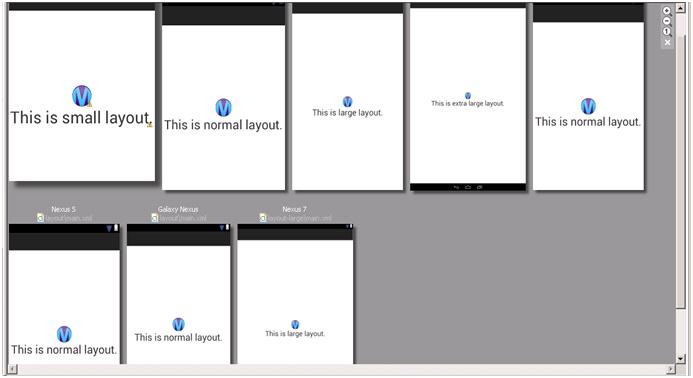
Here is screenshots of all layouts in all portrait modes.
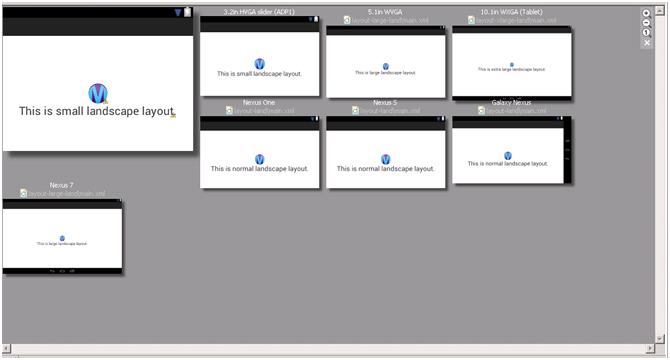
Here is screenshots of all layouts in landscape mode.
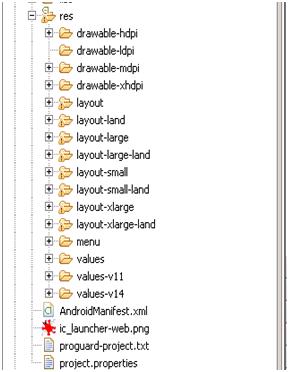
Here is hierarchy of res folder for all screen size.
For the app launcher icon, we also create .png image according to different screen size. Here is icon size for app:
- 36×36 for low-density
- 48×48 for medium-density
- 72×72 for high-density
- 96×96 for extra high-density
|
36 x 36 |
48 x 48 |
72 x 72 |
96 x 96 |
It helps you create layout with less coding and create efficient design of layout for multiple mobile screens.
By: Vipin Jain