You are here:    Home  > Blog  

Improve Your Programming Skills

Most of us at the time of our Engineering consider the programming as a horrible thing . Programming logics may differ from person to person . One may solve a problem using fewer lines of code while other consuming greater . Your programming logic defines the complexity and the time consumption of your program . Lesser the complexity and time consumption of your logic better your program will be considered . One should always keep brushing his programming skills no matter how much experience does he/she contains . Number of sites are there providing various programming competitions , challenges and interview questions . Some are as follows : –

1. Project Euler : This site provides you the math challenges and problem that most of us often face while development
Site URL : http://projecteuler.net/

2. HackerRank :  This site provides you challenges and problem and you can create your own profile congaing all the information of the problems solved by you .
Site URL : https://www.hackerrank.com/

3. cProgramming : This site provides you challenges and problems to be implemented in the various programming languages . The site also contains the tutorials on various topics in various programming languages .
Site URL : http://www.cprogramming.com/

4. CodeBetter : A community of developers who publishes best practices , superior tools , proven logics and techniques .
Site URL : http://codebetter.com/

Most of us often faces problems during development that may kill our hours with no solutions to it . No matter what programming language you use or what operating system you call home , if you have a question it bounds to be answered at StackOverflow . Yes you heard it right

StackOverflow : Sites provided you with the tons of question regarding various topic in programming languages . You need to create profile in order to post your own question or to give answer to any posted question by other user . The is controlled and managed under the keen observation of highly skilled moderator .

By:

Mobile Website Development Simplified

A few years before, most of the website owners who wish for a mobile-interactive website uses a different theme for mobile so that the website can be designed specifically for different mobile devices. In fact some people also prefer to use separate mobile domains. The concept of Mobile website development is a crucial one because it can boost your chances of gaining success in the online business.

In case you are interested in mobile theme then you can use WordPress for switching themes. It will be very beneficial and effective. On the other hand, a responsive theme utilizes the similar staying and a same theme for both websites. In this, a unique combination of media queries and fluid layouts are used which make the content and layout different for devices of different size. In fact it is not only useful for mobile website design and development but it can also beautify the look of a website on large screens and tablets.

Important Concepts About Responsive Design

For finding grip on the responsive design it is important to understand the concepts of web development mentioned below:

  1. Media queries: For integration of additional changes in the CSS, media queries are used in the devices.
  2. Fluid layout: It is a layout for a website which uses width percentages in place of pixels. By using this feature, the width of the website is changed according to the change in the browser.
  3. Smart phones: These are 480px high and 320px wide. It states that the screen width will vary when there is turn around in the device. This feature can be noted before you start with the actual procedure of  mobile website development.
  4. Tablets: The screen size of tablets can vary. For iPhone which is the most preferred tablet, the screen resolution is 1024px high by 768px wide. Tablets like Kindle Fire are smaller in comparison to the iPhone.
  5. Desktop Computers: The width can vary from 1024px and more. It is obvious to place a limit on the layout’s maximum width. It will be helpful for right view of website on larger screens (for instance more than 1200px). In case the feature is not utilized properly then it will be very hard to read the content on larger sized screens. This is why it counted among the important concepts of mobile website design.

Before beginning, it will be a great idea to carefully observe the functionality and content of the website. Without any doubt, it is the right strategy to give better results.

In a discussion about development of mobile website, it will be better to consider the available options which are following:

  1. Utilizing a mobile Plugin.
  2. Implementing a responsive theme which is off-the shelf.
  3. Making a theme responsive.
  4. Developing a mobile theme and utilizing switcher for activation of the mobile devices.

By:

Creating Multilingual Apps in Android

Android

Android apps run in many devices in different regions of the world. To cover the maximum number of users across the world for your android app, Multilingual can play a vital role. Multilingual feature is also known as the localization process of your app.

Before proceeding further, make sure that you have some basic knowledge of creating android apps, handling resources, creating layout XML files etc.

1. Basic Localization Process

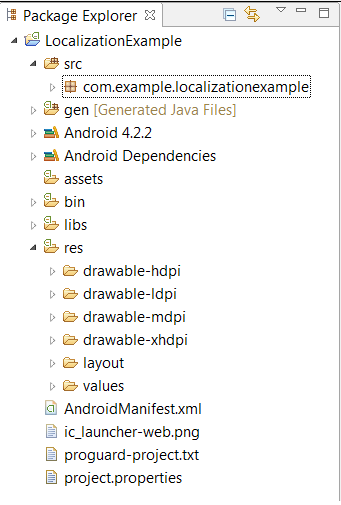
Android loads its resources, text and layouts from /res directory in your project folder. The default structure of the /res directory in project folder is like this:


1. Basic Localization Process

In order to support localization in our app, we need to add some extra folders for resources, strings for that locale. Android OS itself detects the current locale of the device and picks the most relevant resources from the appropriate folder in res directory.

2. Localizing Strings

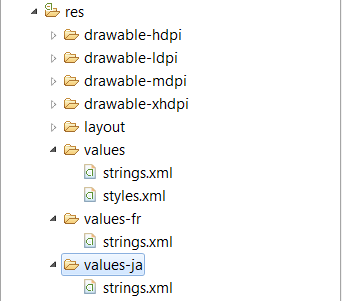
To add support for multiple locales, we have to add additional values folders in the /res directory of our project. The naming convention that will be followed to create the additional directory is: values followed by a hyphen and ISO code of the language.

For example: values-fr/ is the directory containing the simple resources for the language with ISO code “fr”.

Now add the string.xml containing the language specific text to the appropriate folder.

In this example we are focusing on French(values-fr) and Japanese(values-ja).


Localizing Strings

3. Localizing Images

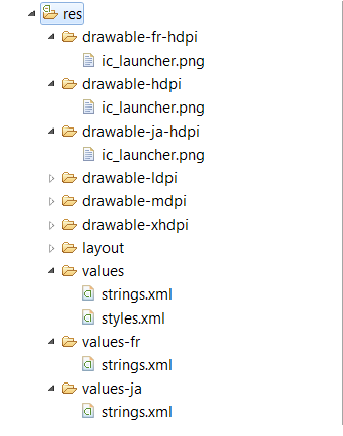
Similar to values directory, we can create separate directory for drawables that includes the images for their respective locales. Android will automatically detects the current locale setting of the device and load the appropriate images in the app.

  • res/drawable-hdpi: Contains default images for high density.
  • res/drawable-fr-hdpi: Contains images optimized for Japanese.
  • res/ drawable-ja-hdpi: Contains images optimized for French.

Similarly, you can create directories for other drawables too.


Localizing Images

4. Testing Localized Application

Once you have localized all the resources in their project, the application is ready for testing.

To test the application, we can set different locales via

Settings -> Language & input or Language & keyboard -> Select Language

and run the application.

5. Localization Checklist

Now as we have understand how to develop multilingual apps in android, let’s look over some checklist that must be kept in mind while developing localized apps:

  1. Never hard code strings in the project, instead use string.xml file.
  2. Never hard code drawables and layouts, instead use drawable and layout directories.
  3. Make sure to include all default directories under /res and all default resources as when Android can’t find any specific locale then it picks the resources from the default directories of resources.
  4. Place your localized resources(images & strings) in the appropriate directories under /res/

Reference links:

  1. http://developer.android.com/guide/topics/resources/localization.html
  2. http://developer.android.com/training/basics/supporting-devices/languages.html

By:

iPhone 5 Optimization Must

We just got an email from Apple that they won’t accept apps which don’t have 4″ screen support from May 1st.

Here is the email we got from Apple today –

Dear developer,

We have discovered one or more issues with your recent delivery for “Dream Countdown”. Your delivery was successful, but you may wish to correct the following issues in your next delivery:

iPhone 5 Optimization Requirement – Your binary is not optimized for iPhone 5. As of May 1, all new iPhone apps and app updates submitted must support the 4-inch display on iPhone 5. All apps must include a launch image of the appropriate size. Learn more about iPhone 5 support by reviewing the iOS Human Interface Guidelines.

If you would like to update your binary for this app, you can reject this binary from the Binary Details page in iTunes Connect. Note that rejecting your binary will remove your app from the review queue and the review process will start over from the beginning when you resubmit your binary.

Regards,

The App Store team

Here is what we should do to optimize app for iPhone 5 4″ screen.

  1. Upgrade to Xcode 4.5 or later .
  2. Add splash screen of size 640×1136 with name – “[email protected]
  3.  Design your app layout with auto layouts see this article –

http://www.raywenderlich.com/20881/beginning-auto-layout

By:

Android App Designing for Multiple Screens

Android Application Develoment

Android supports hundreds device types with several screen size and density. Android ranging from small screen to large TV sets.  Now we create an app that supports multiple android devices. We create an android app that can works on multiple screen size mobile. It enhance your app and able to support multiple mobiles.

Before we create app for android we have to know some terms and concepts.

  1. Screen Size (small, normal, large, xlarge)
  2. Density (ldpi, mdpi, hdpi, xhdpi, nodpi, tvdpi)
  3. Orientation (port, land)

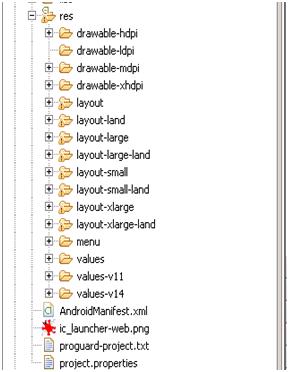
Our res folder in app contains all layout, draw able and values folder. It is responsible for all design aspects in android.

1. Generally android phones screen divided into four sizes. So we have to put following prefix of layout file.

  • res/layout-small.xml → For small screen, its minimum resolution  426dpX320dp
  • res/layout.xml  → For normal screen, its minimum resolution  470dpX320dp
  • res/layout-large.xml → For large screen, its minimum resolution  640dpX480dp
  • res/layout-xlarge.xml → For extra large screen, its minimum resolution  960dpX720dp

2. Density means quantity of pixel within a physical area of screen. It categorized according to density per pixel (dpi).

  • res/drawable-ldpi/icon.png  → For low density (~ 120dpi)
  • res/ drawable-mdpi/icon.png  → For medium density(~160dpi)
  • res/ drawable-hdpi/icon.png  → For high density(~240dpi)
  • res/ drawable-xhdpi/icon.png  → For extra high density (~320dpi)
  • res/ drawable-nodpi/icon.png  → For independent density.

3. For portrait and landscape screen we use this by put port or land prefix.

  • res/layout-xlarge-land.xml  → For extra large screen in landscape orientation.
  • res/layout-large-land.xml  → For large screen in landscape orientation.
  • res/ drawable-xhdpi-land/icon.png  → For extra high density in landscape orientation.

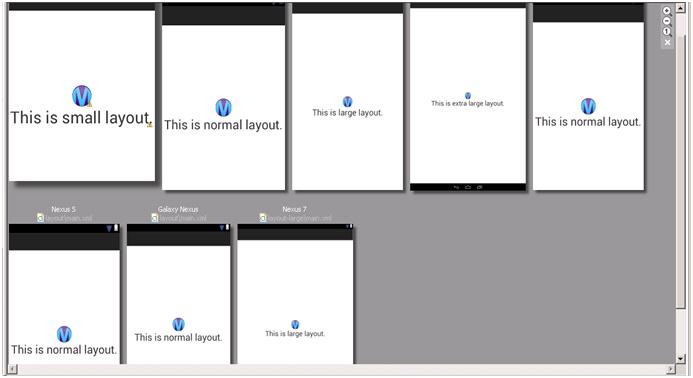
Here is screenshots of all layouts in all portrait modes.

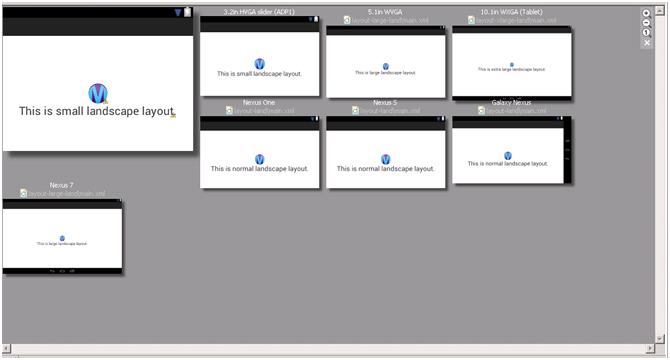
Here is screenshots of all layouts in landscape mode.

Here is hierarchy of res folder for all screen size.

For the app launcher icon, we also create .png image according to different screen size. Here is icon size for app:

  • 36×36 for low-density
  • 48×48 for medium-density
  • 72×72 for high-density
  • 96×96 for extra high-density


36 x 36

36 x 36

48 x 48

48 x 48

72 x 72

72 x 72

96 x 96

96 x 96

It helps you create layout with less coding and create efficient design of layout for multiple mobile screens.

By: